![BATTLEGROUND-LOGO-WITH-TAG415x100px.png]](https://pages.battleground.com.au/hs-fs/hubfs/BATTLEGROUND-LOGO-WITH-TAG415x100px.png?width=332&height=80&name=BATTLEGROUND-LOGO-WITH-TAG415x100px.png)
Introduction
The Battleground Simulation app lets you simulate a crisis incident and practice responding to it with your team in real time.
Injects
Through the workshop you will receive what we call “Injects”. Injects are different ways that information regarding the crisis can come to you. You will be notified by audio and visually of any injects you receive.
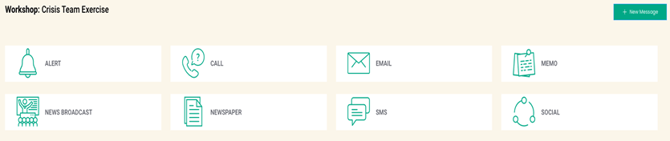
Note: Social injects can appear across multiple social media platforms, including Facebook, Slack, Twitter, and Yammer.
Actions you can take
Viewing Injects: Click on each inject to review the information received.
REPLYING TO INJECTS: Some injects (such as email and SMS) allow you to respond to them. Look at the top right corner for your options.
CREATE NEW MESSAGE: You can choose to reply to injects, or you can compose a new email at any time by clicking the orange button in the top right-hand corner of the screen.
Getting Started
- You will receive an email from the facilitator inviting you to the workshop.
- Press the button in the email to proceed. This will take you to the Battleground Simulation app on your web browser.
- Once the app has opened, you will see one of the following stages: